Notch & menu bar app for Mac

Your Mac, with ⌘X to move files. everything you copied. your terminal always at hand. lyrics for what's playing. screenshots that read text.Your tools. One app.

Cortavo lives in your MacBook's menu bar and notch: cut and paste files, clipboard history, screenshots with OCR, window management, a terminal, and lyrics for what's playing.

The macOS menu bar with Cortavo's icons
It lives at the top right. Every icon is optional.
Cielito lindo · Traditional
De la Sierra Morena, cielito lindo, vienen bajando
un par de ojitos negros, cielito lindo, de contrabando
in syncor swipe up and down Open the folder
01 / 06 · Lyrics

Lyrics, right as they're sung

They light up with the song, and two fingers nudge them if they run ahead.
Cielito lindoTraditional — Songs of Mexico
0:16
-3:12
02 / 06 · Player

What's playing, always at hand

The tab that's actually playing, with its controls and one click to jump to it. For now it works with YouTube and YouTube Music; more sources are coming.

✳ Claude Code+
❯ run the tests and tell me if they pass
⏺ Bash(./build.sh --test)
⎿ 1160/1160 checks passed
⏺ All passing: 1160 of 1160 checks.
❯
▸▸ auto mode on (shift+tab to cycle)

Scroll the app view to see every detail.

03 / 06 · Terminal

Your terminal, one gesture away

Tabs, your usual shell and Claude Code, without switching windows.

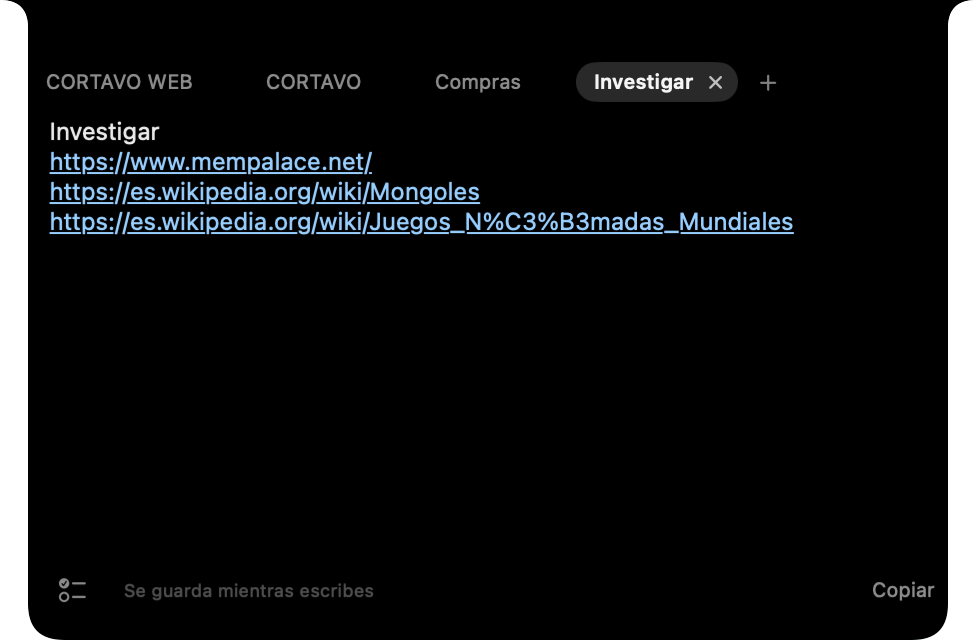
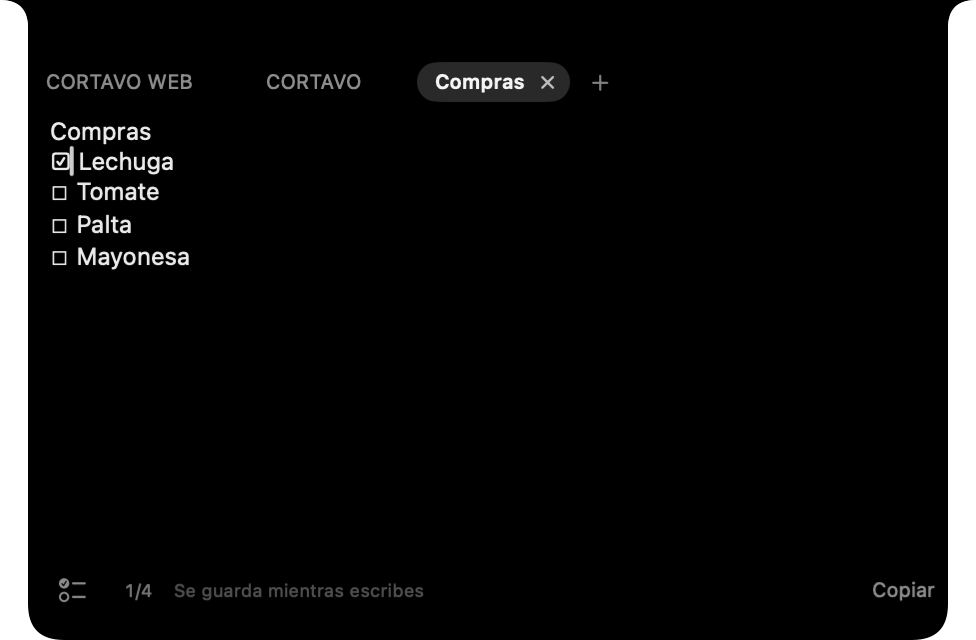
Notch notes with a shopping list and checkboxes

Scroll the app view to see every detail.

04 / 06 · Notes

Notes that don't need a name

iPhone-style checkboxes and links that open with one click.

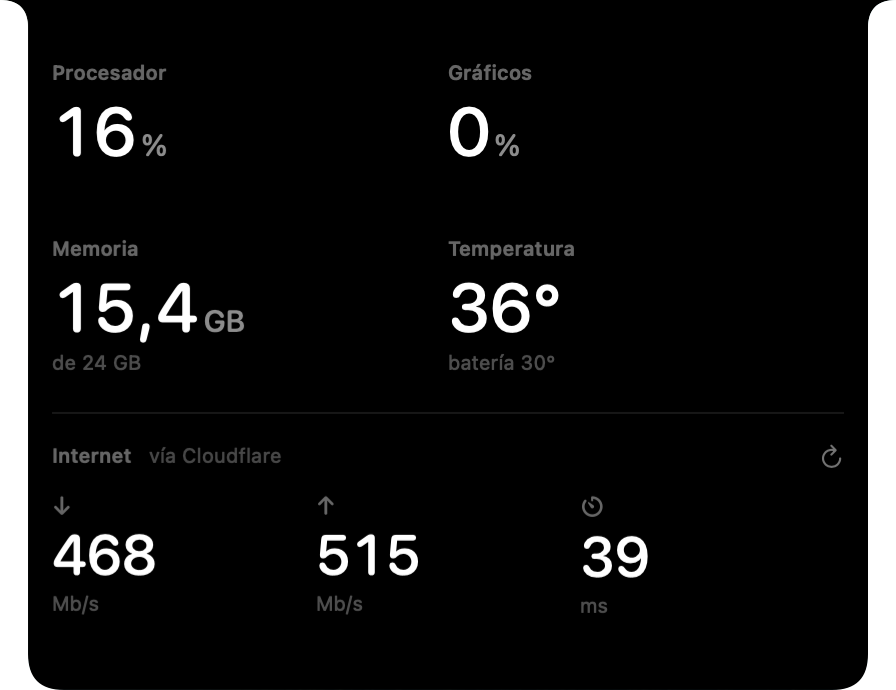
Mac activity: CPU, graphics, memory, temperature and network

Scroll the app view to see every detail.

05 / 06 · Activity

How your Mac is doing, at a glance

CPU, graphics, memory, temperature and network.

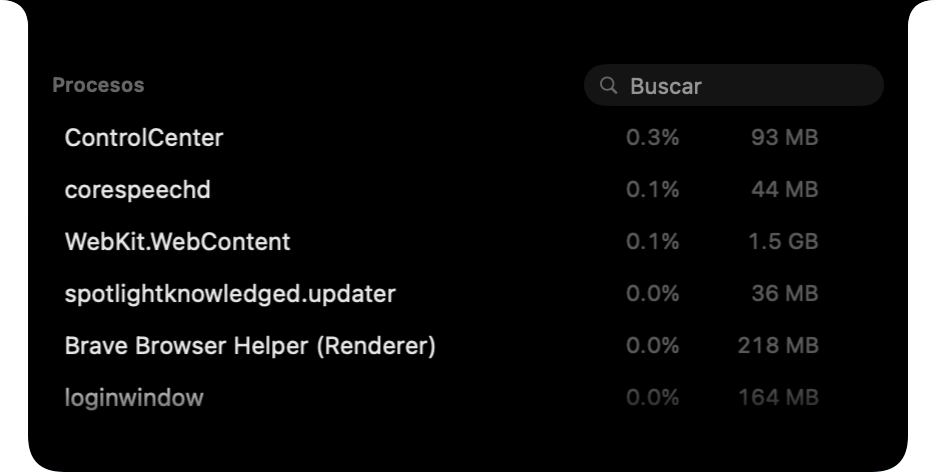
Process list with search

Scroll the app view to see every detail.

06 / 06 · Processes

What's using resources, and how to stop it

Find a process and quit it without opening Activity Monitor.

01 / 06 · Lyrics

Lyrics, right as they're sung

They light up with the song, and two fingers nudge them if they run ahead.
Scroll to go through the notch pages.
Small shortcuts for everything you do every day.
From one task to the next

Keep going.

Recover, capture and write. Without losing your train of thought.

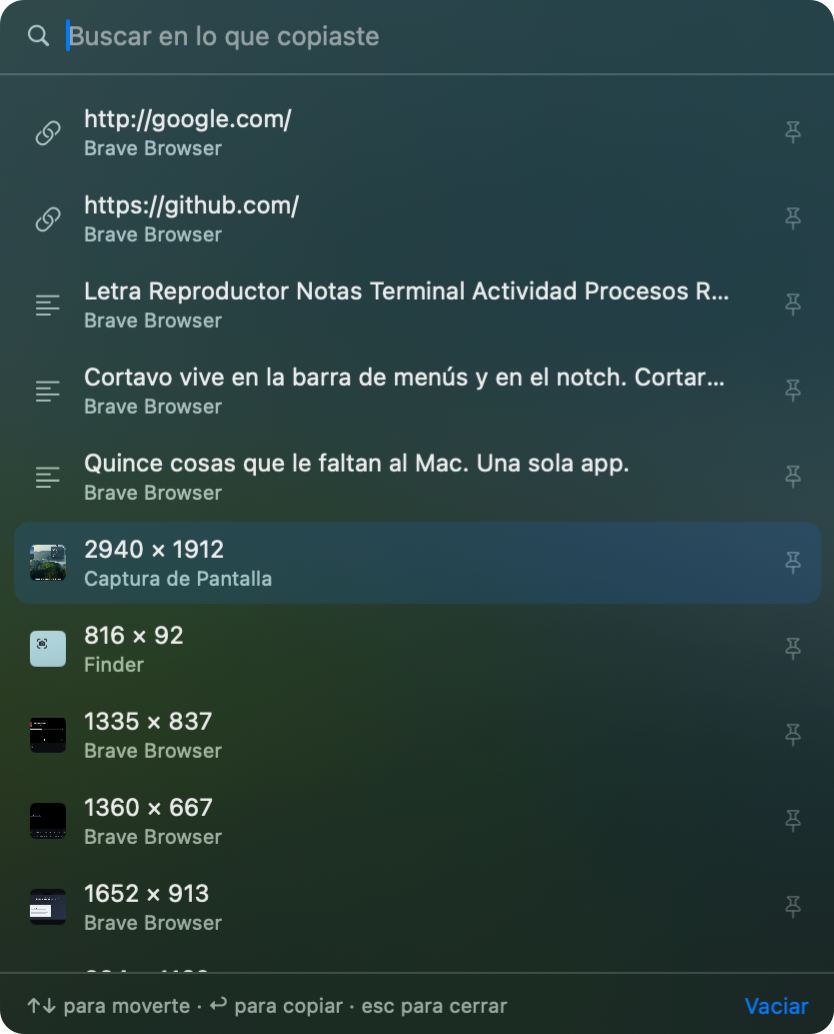
Cortavo clipboard history
01 / Clipboard

You copied it. You have it.

Get back text, links, files and images from your history.

02 / Screenshots with OCR

If you can see it, you can copy it.

Pull words out of an image. Recognition runs on your Mac.

03 / Snippets

A few letters. All written.

Turn your shortcuts into reusable signatures, addresses and templates.

All of this, in one app

Move files, open your terminal, keep notes and follow the music from the same app.

Finder and terminal, connected

Open a terminal tab in the Finder folder.

Turn on the option and open a tab from Finder: it starts in the folder in front of you. Sessions that were already open keep their directory.

Your usual shell, ready for Claude Code too.

✳ Claude Code+
❯ run the tests and tell me if they pass
⏺ Bash(./build.sh --test)
⎿ 1160/1160 checks passed
⏺ All passing: 1160 of 1160 checks.
❯
▸▸ auto mode on (shift+tab to cycle)
⌘X and ⌘V move files in Finder too.Cut, paste and undo, without extra copies.
Batch rename with preview.In the same app as your notch.
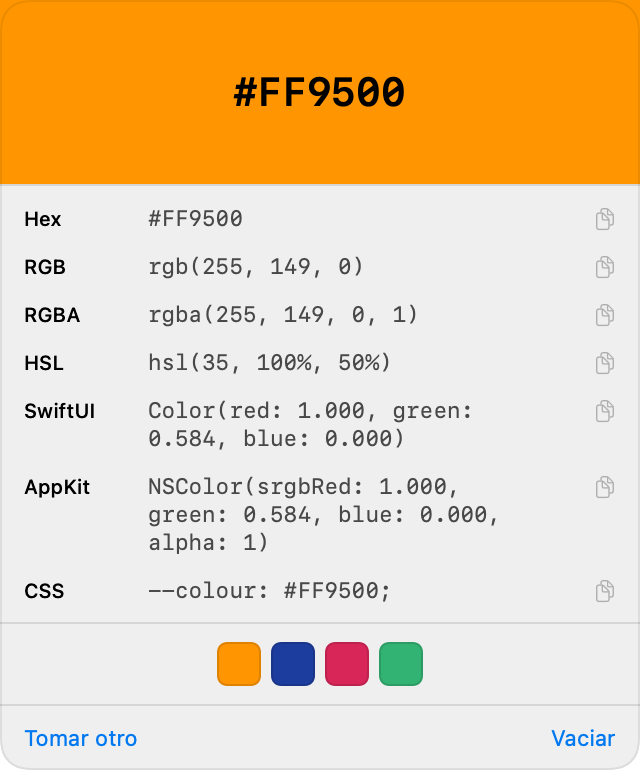
A color picker that writes SwiftUI and AppKit.Ready to paste.

Lyrics, floating over your work

Synced with what's playing. Pin them, make them transparent and they stay on the desktop without getting in the way: clicks pass through to what's underneath.

To bring them back, hold the pointer on the notch for three seconds or stop the music.

Notes with tabs, checkboxes and links

Each tab is named after its first line. Checkboxes work like on the iPhone and links open with one click. All in plain text.

⌘C⌘V↩
A note with checkboxes
A note with links

Type three letters, get the paragraph

Save a text once under a short shortcut, and from then on typing it in any app inserts the full text. With date, time and clipboard.

Signatures, templates and variables, inside Cortavo.

Other apps for similar tasks

References by feature, each with its own scope and license. Checked in September 2026; amounts in USD, rounded unless noted. Check each source to confirm price, taxes and license.

Notch panelNotchNook · One-time purchase · referenceUS$25
⌘X for filesCommand X · One-time purchase · referenceUS$4
Clipboard historyPaste · Annual plan · referenceUS$30/year
File shelfYoink · One-time purchase · referenceUS$9
Screenshots and annotationsCleanShot X · License with one year of updatesUS$35
OCRTextSniper · Price depends on licenseSee site
Window managementRectangle Pro · Current price in its storeSee site
Text expansionTextExpander · Price depends on planSee site
GIF recordingGifox · Pro · referenceUS$15
Color pickerSip · License with one year of updatesUS$30
Keep awakeAmphetamine · Free appFree
Batch renameName Mangler · One-time purchase · referenceUS$19
Menu bar managementBartender · v6 license · referenceUS$20
Quick notesQuick Note · One-time Pro purchase; regional pricingSee site
Synced lyricsNotchy · getnotchy.app · Monthly plan listed on this siteUS$4.99/month
Lyrics and terminal in the notchNotchy · notchy.dev · Offer listed on this siteFree

These apps are not full equivalents of Cortavo and their features may overlap. The amounts do not represent a necessary expense or guaranteed savings.

The two references named Notchy are identified by their domain. Each price belongs to the linked site; synced lyrics are not exclusive to Cortavo. Sharing that feature does not mean an identical floating mode or gesture adjustment.

Always one click away

Each row tells you which permission it needs before you try it. Nothing turns on by itself.

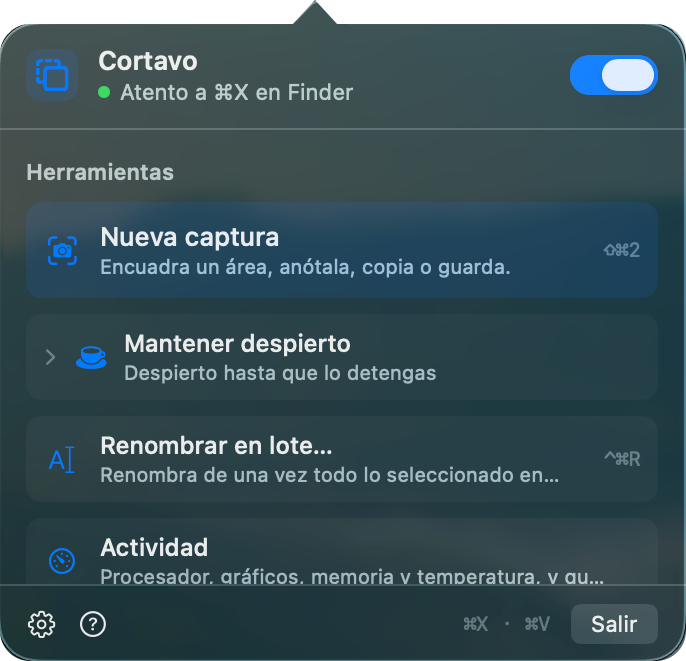
Cortavo's panel in the menu bar

The panel

Every tool, with its shortcut next to it.

⇧⌘2⌃⌘R
The clipboard history

The clipboard

Text, links, files and images. Anything a password manager marks never gets in.

⌃⌥V
The color picker

The color

Any pixel, written seven ways — including SwiftUI and AppKit.

⌃⌥P

Everything it does

Tools, integrations and settings, organized like the app's guide.

Files and text

Cut and paste files

Use ⌘X and ⌘V in Finder to move files. Cortavo marks the selection and asks you to resolve conflicts before pasting.

A shelf for your files

Shake while dragging to open the shelf. Group files into stacks, pull one out or move the whole batch; hold ⌥ to copy.

Clipboard history

Get back text, links, files and images with search and pins. Content marked confidential by password managers is excluded.

Text expansion

Turn typed shortcuts into signatures, addresses and templates. Includes date, time, clipboard and cursor position.

Batch rename

Prefixes, suffixes, find and replace, regular expressions, numbering, case and extensions. Review the names before applying the change.

History and undo

See recent moves and renames. Undo a whole batch, including replacements that can be recovered.

Screenshots, recording and color

Annotated screenshots

Freeze the screen, select an area, adjust the framing and draw on it before copying or saving.

Text from an image

Select words you can't copy and get them back as text. Recognition runs on your Mac.

Video and GIF

Select an area of the screen and record it as video or GIF.

Color picker

Pick a pixel with a magnifier and copy its color in seven formats, including SwiftUI and AppKit.

In the notch

Six pages, one gesture away

Move the pointer to the notch and switch between lyrics, player, terminal, notes, activity and processes.

Player and music sources

Artwork, controls and progress bar. Pick another supported source to start playing it and pause the rest.

Tabbed terminal and Finder

Your login shell, with tabs. With the option on, a tab opened from Finder starts in its folder; an open session keeps its directory.

Activity and network

Check CPU, GPU, memory, temperature and network traffic. Run a speed test and check connection latency.

Notes with tabs and checkboxes

Tabs named after their first line, checkboxes and links that open with one click. Notes saved as plain text.

Synced, floating lyrics

Follow the line being sung and the next one. Adjust sync with two fingers and turn on the transparent mode that lets clicks through.

Processes under control

Find processes, check their usage and ask them to quit. You can also force quit when needed.

Windows and Mac controls

Arrange windows

Halves, thirds, quarters and sixths from the keyboard, across your displays. Repeat supported shortcuts to resize.

Clear and restore the desktop

Minimize windows with one click and restore the group Cortavo minimized.

Minimize from the Dock

Turn on the option to minimize the current app's windows by clicking its Dock icon.

Keep your Mac awake

For a while, up to an hour, or while an app runs. Choose whether the display stays on and whether it stops on battery.

Collapse the menu bar

Keep the icons you need in view and hide the rest behind the expand control.

Shortcuts your way

Choose which tools get their own icon. The rest stay available from the panel.

Four languages

Switch between Spanish, English, Portuguese and French in the app.

Permissions and built-in guide

See which permission each feature needs and how to enable it. The guide explains how to use the tools.

How it's built

Measured numbers, not promises.

0dependencies. Hand-written Swift.
1160checks on every build.
0.55 %of one core at idle, with music playing.
4languages: Spanish, English, Portuguese and French.

No accounts, no telemetry. OCR runs on your Mac; lyrics lookup only goes online if you turn it on.

A plan for the way you work

We are preparing Cortavo's plans. Prices and included features will be announced soon.

Developer

For people who build software on a Mac.

Coming soon

Feature set and per-license price to be announced.

Request purchase

Office

For everyday work.

Coming soon

Feature set and per-license price to be announced.

Request purchase

Enterprise

For teams and companies.

Coming soon

Business pack per license. Volume and terms to be announced.

Request purchase

Scroll the image to read the details.

Cortavo screenshot in detail